A clear starting point
Maps, navigation and route-planning apps
Feature graphic template
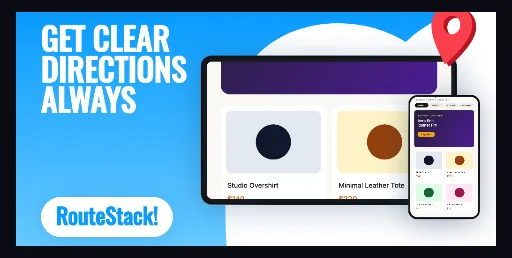
Sky-blue #099BFF-to-#66CAFF banner with a white cloud hill on the right, a landscape Android tablet at 53.5% scale, a portrait phone bottom-right, a red #FA3E4C location pin tilted 10 degrees and a white brand pill.
Free plan ($0 forever) · Pro $69/yr · No credit card required
Every background fill, gradient stop and headline color remains editable in Studio.
Practical walkthrough
Drop your map or route screen into the landscape tablet slot and a detail screen into the portrait phone slot; both frames hold their own capture.
Keep the headline inside the 870 × 424 px band Play’s 7.5% per-edge crop leaves — 77 px each side, 38 px top and bottom — and the 68 px type wraps fine there.
Recolor the white brand pill’s shadow and the pin fill, then export a 24-bit PNG without alpha at 1024 × 500 px.
Maps, navigation and route-planning apps
Travel and local-discovery listings
Any Play banner that needs a wide map area instead of three phone frames
A single 1024 × 500 px Play asset. The background is a horizontal gradient from #099BFF to #66CAFF, with a white cloud-hill path starting at 44% of the width covering the right half so the devices sit on a light surface. A landscape Android tablet at 53.5% scale fills the right half of the banner, and a portrait Android phone at 15% scale overlaps its bottom-right corner — two independent image slots, so a navigation app can show the map and the turn-by-turn panel in one banner. A #FA3E4C location pin with a #B81424 shadow layer, tilted 10 degrees, breaks the top edge near the right corner for depth. The headline box is 323 × 235 px starting 53 px from the left and 30 px from the top at 68 px Inter type, and the white brand pill sits at 53 px / 395 px, 282 × 86 px with #0D99FF lettering. Everything — gradient, cloud path, both device frames and their captures, pin, headline and pill — stays editable. It belongs to the Google Play feature graphic template family; the midnight amber forum banner is the two-phone dark alternative. The royal care digest banner is the health-app counterpart: same 1024 × 500 canvas, a flat royal-blue field and one upright phone instead of a tablet-plus-phone pair.
Questions
Yes. Upload your own PNG, JPEG or WebP app captures when creating the project and every device slot updates automatically.
Yes. The template opens as structured text, image, device and vector layers—never a flattened bitmap.
Yes. Connect https://appscreendesign.com/mcp in Claude, ChatGPT, Cursor or Codex and use the copyable prompt on this page.
Start with a composition. Keep every detail editable.