A clear starting point
Community, forum and Q&A apps
Feature graphic template
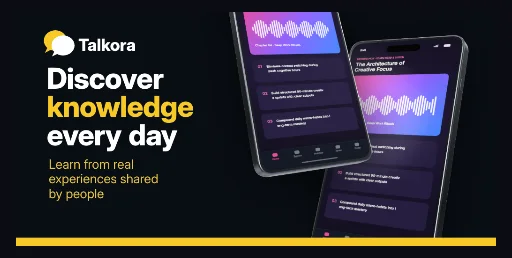
Charcoal #090E14 banner with a two-bubble brand mark, a three-line white headline whose key word turns #F7C927, an amber subtitle and two overlapping 3D Android phones on the right.
Free plan ($0 forever) · Pro $69/yr · No credit card required
Every background fill, gradient stop and headline color remains editable in Studio.
Practical walkthrough
Replace the two demo screens with your own captures; both phone frames hold independent image slots.
Keep the brand mark and headline inside the 870 × 424 px band that survives Play’s 7.5% per-edge crop — 77 px each side, 38 px top and bottom.
Recolor the 18 px bottom bar and the emphasis word, then export a 24-bit PNG without alpha at 1024 × 500 px.
Community, forum and Q&A apps
Dark Play listings that keep the brand mark in the corner
Apps whose name is the promise, with the benefit in the keyword
One 1024 × 500 px asset, not a sequence. The canvas is solid #090E14 charcoal, and the only warm color is #F7C927: the back speech bubble, the emphasis word inside the headline, the 18 px bar across the bottom edge and the #EAC645 subtitle. The headline block starts 65 px from the left edge and is 374 px wide, sized at 62 px Inter ExtraBold with 0.98 line height and −0.02 letter spacing, so a three-line promise and a 27.5 px subtitle both stay inside the 870 × 424 px guarded band. Two generic Android phones overlap on the right — the front one rotated −12°, the back one 11° — each with its own image slot and body colors, which is why a forum or Q&A app can show a feed and a thread at once. The brand mark, brand name, headline, emphasis word, subtitle, both phones and the bar stay separate editable layers; the page is part of the Google Play feature graphic template family, and the emerald fanned market banner is the lighter three-phone counterpart, and the sky route tablet duo banner swaps the phone stack for a landscape tablet with a map-ready capture.
Questions
Yes. Upload your own PNG, JPEG or WebP app captures when creating the project and every device slot updates automatically.
Yes. The template opens as structured text, image, device and vector layers—never a flattened bitmap.
Yes. Connect https://appscreendesign.com/mcp in Claude, ChatGPT, Cursor or Codex and use the copyable prompt on this page.
Start with a composition. Keep every detail editable.