A clear starting point
Health, medical and clinic apps
Feature graphic template
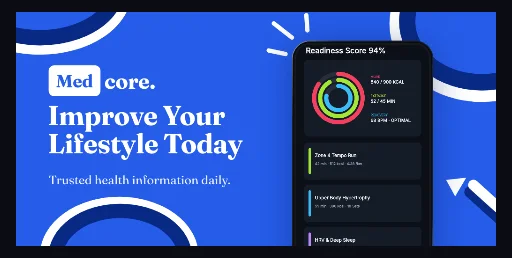
Royal-blue #265CE9 health banner with white and #082A85 corner rings, a serif “Med core.” lockup, a two-line Fraunces headline and one upright flat Android phone at 29.5% scale.
Free plan ($0 forever) · Pro $69/yr · No credit card required
Every background fill, gradient stop and headline color remains editable in Studio.
Practical walkthrough
Replace the single Android capture with your own screen; the flat frame sits upright at 29.5% scale, so a 1080 × 1920 capture loses nothing.
The headline box starts 68 px from the left edge — move it to 77 px if you attach a promo video, because that is where Play’s crop guide begins.
Edit the badge lettering and the brand line as separate Fraunces layers, then export a 24-bit PNG without alpha at 1024 × 500 px.
Health, medical and clinic apps
Editorial and digest listings that want serif type instead of heavy sans
Play banners that show one phone screen rather than a fan of three
One 1024 × 500 px Play asset on a flat #265CE9 royal-blue field — no gradient, so the file compresses cleanly as a JPEG at the 2.048:1 ratio Play Console lists. Depth comes from six stroked ellipses: three corner rings, each drawn twice, a 23 px #FFFFFF ring with a #082A85 ring of the same centre inside it at the top-left, bottom-left and top-right. Three white rays between 33 and 49 px wide and 4 px tall sit 21–84 px from the top edge above the headline, and a white arrowhead with a navy-backed stem climbs the lower-right corner. The lockup is a 111 × 66 px white rounded-rect badge holding 38 px #265CE9 Fraunces Bold lettering next to a 46 px white Fraunces brand line, both starting 114 px from the top. The headline box is 471 × 138 px at 68 px from the left and 195 px from the top, set at 59 px Fraunces Bold with 1.02 leading, so two lines fill it, and the 26 px #ECF2FF subtitle sits at 70 px / 348 px. A single upright flat Android phone at 29.5% scale is centred 74% across, which leaves the type block clear on the left third. Badge, brand, headline, subtitle, all six rings, the rays, the arrowhead and the phone frame stay separate editable layers. It belongs to the Google Play feature graphic template family, and the emerald fanned market banner is the centred-headline counterpart that trades the ring accents for a three-phone fan.
Questions
Yes. Upload your own PNG, JPEG or WebP app captures when creating the project and every device slot updates automatically.
Yes. The template opens as structured text, image, device and vector layers—never a flattened bitmap.
Yes. Connect https://appscreendesign.com/mcp in Claude, ChatGPT, Cursor or Codex and use the copyable prompt on this page.
Start with a composition. Keep every detail editable.