Prevent awkward phrase-splitting wraps
Adjust text box width or explicit line breaks on your ja locale so particles and compound Kanji terms stay grouped naturally.
Localization guide
Japan is one of the highest-ARPU mobile markets in the world—and Japanese users immediately spot awkward mid-particle line wraps or untranslated English UI screenshots.
ja (Japanese)Left-to-Right horizontal UI · High character density−15% to −30% character count vs English, fuller glyph heightFree plan ($0 forever) · Pro $69/yr · No credit card required
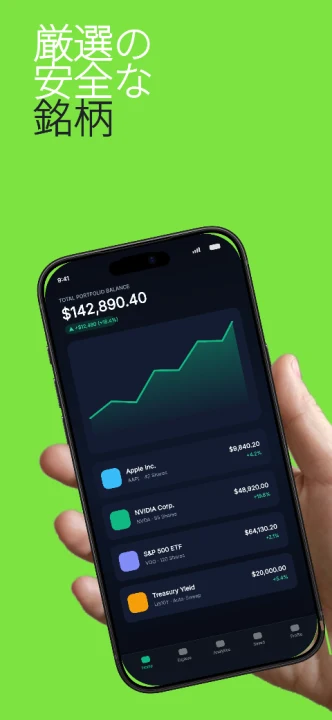
All 50 App Store Connect locales are built into every AppScreenDesign project with independent copy, raw captures and layout overrides.
Practical walkthrough
Pair native Japanese UI screenshots with clean Kanji/Kana line breaks.
Adapt headlines around concrete outcomes rather than literal English syntax.
Show Yen (¥) pricing, Japanese dates and native UI labels inside every device frame.
Inspect every panel at thumbnail scale so particles never orphan on a trailing line.
Adjust text box width or explicit line breaks on your ja locale so particles and compound Kanji terms stay grouped naturally.
Bind Japanese simulator screenshots to the ja locale slot so users see native menus, Yen (¥) formatting and local content.
Japanese top-chart screenshots often pair a concise benefit headline with structured feature pills—use templates like Feature Pills or Finexa cleanly.
Direct word-for-word English slogans often sound unnatural in Japanese. Have your agent or translator draft natural Japanese store headlines tailored to the exact character grid of each panel.
Use preview_panel over MCP or open the ja locale selector in Studio to inspect Kanji stroke clarity at store thumbnail size.
Questions
Yes. Free ($0 forever) includes the full 3D browser studio, ready-made template library, Remote MCP access to test AI agents, and unlimited draft projects with watermarked preview exports.
Never. Every scene stays an editable multi-layer SceneDoc with live text, 3D hardware poses, backgrounds, vector badges and per-locale overrides.
No ($0 AI markup). Connect Claude, ChatGPT, Cursor or Codex via https://appscreendesign.com/mcp using the AI subscription you already have.
Start with a composition. Keep every detail editable.