A clear starting point
Resale marketplaces and collectibles apps
5-panel template
Five 1320 × 2868 panels on a solid #050505 canvas: 143 px white headlines, one centered iPhone 18 Pro Max frame at 86% scale in every panel, a white promo burst seal and hand-drawn white oval highlights.
Free plan ($0 forever) · Pro $69/yr · No credit card required
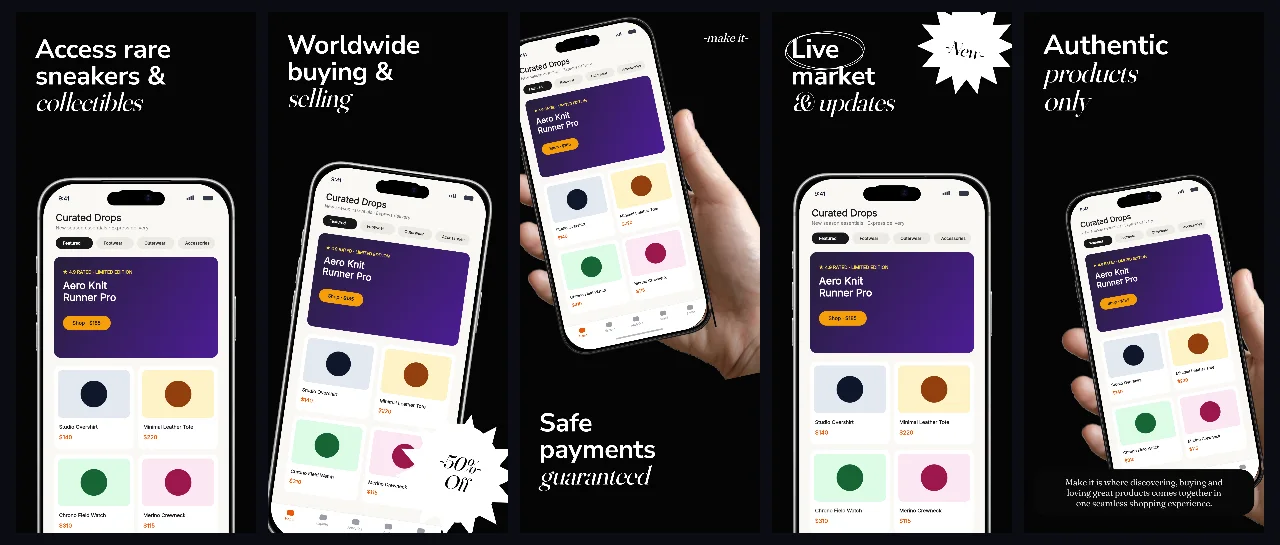
Every background fill, gradient stop and headline color remains editable in Studio.
Practical walkthrough
Drop your product shots into the five iPhone slots; the frame sits centered at 86% scale, so captures keep their full aspect with rounded corners visible.
Keep headlines to the 106 px left inset and 1109 px width — at 143 px type the box holds two lines before the renderer shrinks the block.
Recolor the panel 5 subtitle card (#080808) and the #E5E5E5 subtitle, then export all five panels at 1320 × 2868.
Resale marketplaces and collectibles apps
Sneaker, streetwear and luxury consignment shops
Dark listings where product photography should carry the color
Five panels, all on the same solid #050505 background, which is why the set reads as one listing rather than five images. Every panel carries one centered iPhone 18 Pro Max frame at 86% scale with its own image slot, so the product photography is the only color on the screen. Headlines sit in a box inset 106 px from the left and 138 px from the top, 1109 px wide and 602 px tall, set at 143 px white Inter type; panel 5 raises the headline to 155 px and adds a #080808 subtitle card with #E5E5E5 supporting text. Panel 2 introduces a white promo burst element with a #050505 label, panel 3 adds a 92 px brand line above the device, and panel 4 draws two white stroked ellipses 33% and 32% wide around its label for a hand-drawn ring. Text, frames, seals and ovals stay editable layers. It belongs to the dark-mode App Store screenshot templates family; the headline above device dark glow template is the single-panel version with a radial glow instead of a flat black field. For a streaming catalogue the cinema gold prestige set keeps the same #050505 field but swaps product photography for condensed 155 px Oswald headlines with gold emphasis lines.
Questions
Yes. Upload your own PNG, JPEG or WebP app captures when creating the project and every device slot updates automatically.
Yes. The template opens as structured text, image, device and vector layers—never a flattened bitmap.
Yes. Connect https://appscreendesign.com/mcp in Claude, ChatGPT, Cursor or Codex and use the copyable prompt on this page.
Start with a composition. Keep every detail editable.