App Store screenshots
Writing screenshot captions that pass App Review
Caption text on a screenshot is not a field you fill in. It is pixels inside the PNG, exported with the device frame, and reviewed exactly as it renders. Apple and Google both allow text overlays, and both have rules about how much of the frame that text may take. Settle the line before you design the panel.
By AppScreenDesign · Published · Updated
Captions live inside the image
App Store Connect has one description field per locale and no caption field per screenshot. Whatever a panel says is drawn into the file, so a wording change means re-exporting every panel that carried the line. That is the practical argument for finishing the copy first: three rounds of font experimentation cost three export rounds, and the exports are what review sees.
Google Play does give you an alt text field per screenshot, and it is separate from the baked caption. It is the only version a screen reader announces. Play asks for 140 characters or fewer, shaped like "The transaction complete screen" rather than a slogan. Write it at export time or it never gets written, and the caption stays invisible to assistive technology.
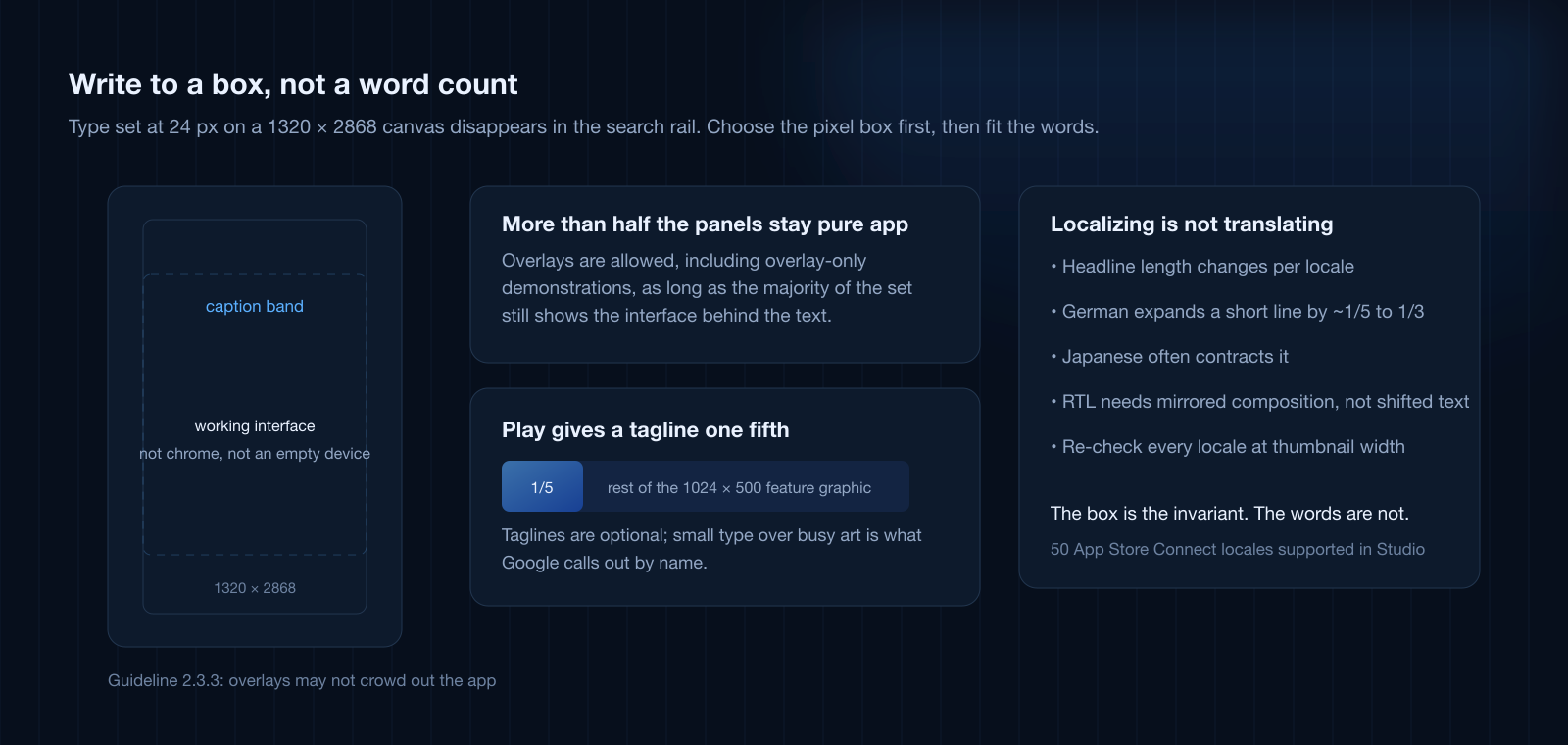
Both stores judge the image itself. Type set at 24 px on a 1320 × 2868 canvas vanishes in the search rail, and no review team accepts "it reads fine on a desktop monitor" as an explanation.
More than half the panels must still be the app
Apple publishes the arithmetic instead of leaving it to taste: App Review approves a set only when more than half of the screenshots for a device show the app in use. Three panels means two must carry real interface. Four panels means three. A set of five where each panel is a headline over a gradient fails on the count alone, however good the typography is.
Guideline 2.3.3 permits text and image overlays, and Apple's help page draws the boundary: overlays must not crowd out the app, and a screenshot must not show only hardware or an overlay with no interface behind it. The caption sits on top of a working screen, not in place of one.
Guideline 2.3.10 covers the neighbouring mistake. A status bar with another platform's carrier art, or an Android navigation bar dropped into an iPad slot, is read as a reference to a competing store and assessed under that rule. Crop first, then add type.
The majority count is enforced rather than advised. A set under the threshold is rejected under 2.3.3 and the version waits, so count before exporting rather than after. Fixing screenshot rejections takes the same threshold from the rejection side, including the panels reviewers flag ahead of the artwork.
Write to a box, not a word count
With no character limit to aim at, pick a physical one. Set the caption box width on the canvas, choose the type size, then measure the longest word in the longest locale. Write to that width. A line that needs a comma and a second clause to hold together is two captions, or a paragraph that will clip.
One idea per panel keeps lines short without a rule about syllables. "Split the bill in two taps" survives translation and thumbnail scaling. "Everything you need to manage shared expenses with friends and roommates" does not, and it will be the first panel to overflow.
Check the export at the size the store actually uses. iOS search results render the leading portrait panels as a horizontal rail, and Play places screenshots on homepages at sizes the browsing device decides. Open the PNG at thumbnail scale on a phone, not in the editor at 400 percent.
Words Google lists as avoidable
Play's preview asset help names the vocabulary: Best, #1, Top, New, Free, Discount, Sale, Million Downloads. It also asks publishers to avoid calls to action such as "Download now", "Install now", "Play now" and "Try now", plus anything suggesting a store ranking, an award, a user testimonial or a price promotion.
Apple's version is broader and vaguer. Metadata has to reflect the app accurately, screenshots must not carry misleading marketing, and paid content has to be visible as paid under guideline 2.3.2. A caption promising a premium feature with no hint of the subscription behind it is the ordinary failure, not the exotic one.
The safe sentence describes an action the build performs. "Export in CMYK" passes because the export exists. "Ranked number one for invoices" fails twice, and nobody has to install the build to see it.
Google's budget for a tagline
Taglines are optional on Play, and the help page asks for one only where it carries something the interface cannot. Where a tagline does appear, it should take no more than a fifth of the image. Small type over a busy background is the pattern Google calls out by name, because neither survives the phone-sized render.
Two more Play details bite at export time. Extra text on large-screen screenshots gets cut off on Play homepages at some sizes, so tablet captions need to be shorter than phone captions rather than the same line scaled up. And the status bar should be clean: no notification icons, no carrier name, full signal and battery indicators.
Localizing a caption is not translating a sentence
Google asks that any added tagline or text overlay be localized even when the in-app interface stays in its original language. Apple assesses each localization's screenshots separately against the majority rule, so a weak translation cannot hide behind a strong English set.
The layout is the harder half. German compounds stretch a caption box sideways, Japanese cuts the glyph count while changing line height, and Arabic reverses reading direction, which moves where a caption sits relative to the device. Re-measure in each locale instead of shrinking the type until it fits. The localization workflow covers per-market exports, and localizing screenshots without a relayout shows the same caption box surviving German, Japanese and Arabic strings, and the Google Play size reference lists the aspect ratio each slot expects.
A short check before export
Read the set in this order. Does the caption name an action the built app performs. Is the real interface visible behind it in more than half the panels. Does the line fit the box in the longest locale. Is any word from Google's list still there. Does the alt text describe the screen instead of the pitch. Five questions, one pass, before the upload.
Then keep each caption in the same document as the panel it belongs to. One project per locale, one caption object per panel, and the published set matches the file after a wording change. Headline above device templates hold the caption and the UI in a single composition, and the editor keeps every device size of that composition together.
The neighbouring decisions have their own write-ups: screenshot order for the sequence, and A/B testing for putting a caption variant against the live page.
Questions
Common questions.
Are captions allowed on App Store screenshots?
Yes. Guideline 2.3.3 permits text and image overlays, including overlays that demonstrate an input method. The condition is that more than half of the screenshots for each device still show the app in use, and that the overlay does not crowd out the interface.
What is the character limit for screenshot captions?
There is no caption field and no character limit. App Store Connect and Play Console both take an image, so the limit is the pixel box: the width you set on the canvas at the type size you chose, measured against the longest word in the longest locale.
Why does Google Play advise against "Download now" in a screenshot?
Play lists calls to action among things to avoid in screenshots, alongside ranking words such as Best, #1 and Top, and price promotion copy. The listing itself is the download button, so the call to action duplicates the interface and dates quickly.
Is Play alt text the same as the caption drawn on the image?
No. Alt text is a separate field per screenshot, kept to about 140 characters, and it describes the screen for screen-reader users. A caption drawn into the PNG is not announced, so the two need writing separately.
Where to go next
Build the sequence once.
Export it at every store size.
Compose every panel in one editable project, then export the exact presets App Store Connect expects.