A clear starting point
Career academies, cohort courses and upskilling apps
Five-panel course template
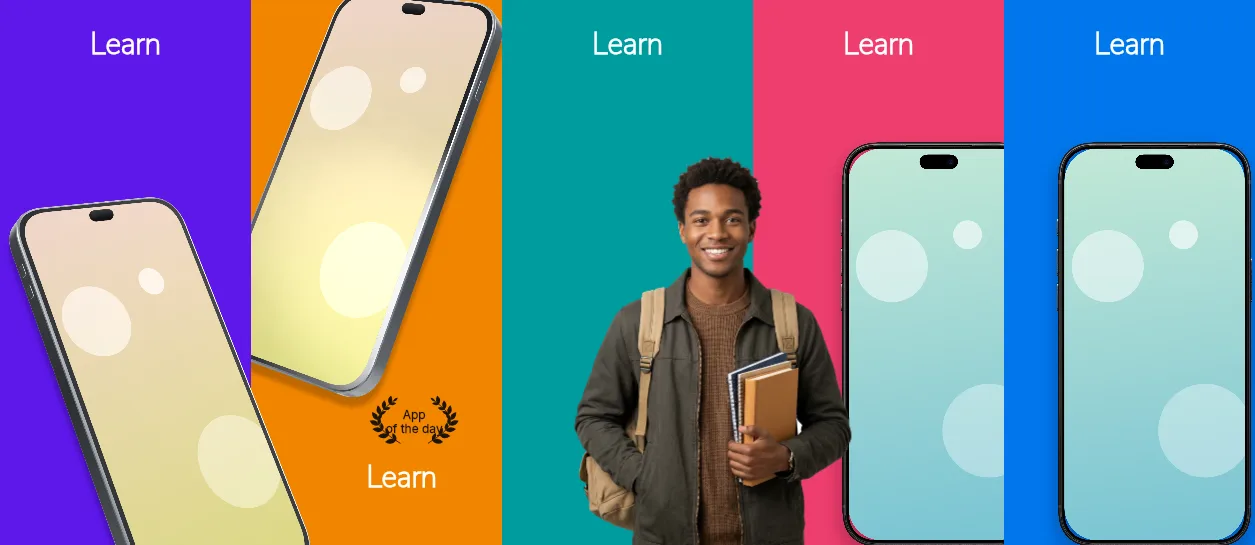
Five different flat panels from #5E17EB violet through #F28500 orange, #009C9E teal and #EE3E6E pink to #0076EC blue, with one 155 px white headline position and phones tilted −23° then upright at 80%.
Free plan ($0 forever) · Pro $69/yr · No credit card required
Every background fill, gradient stop and headline color remains editable in Studio.
Practical walkthrough
Use one capture per panel; panels 1–2 carry 151% tilted phones at −23° and +23°, panels 4–5 upright 80% phones, so plan the pair before you upload.
Keep each headline to one short phrase — the box is 1,056 × 416 px and every panel uses the same position, so a longer line shrinks every panel at once.
Recolor all five backgrounds individually and replace the five one-word headlines, then export five 1320 × 2868 PNGs.
Career academies, cohort courses and upskilling apps
Listings that want one word per panel
Programs sold on outcome rather than interface detail
Five 1320 × 2868 px panels, each on its own flat colour: #5E17EB, #F28500, #009C9E, #EE3E6E and #0076EC, in that order. The geometry is deliberately identical on four of them — a 155 px white Nunito Sans headline in a 1,056 × 416 px box at 132 px from the left and 158 px from the top — so swapping one word per panel keeps the set aligned. Panel 1 tilts a black iPhone 18 Pro Max to −23° at 151% scale, 64% across; panel 2 adds a second phone at +23° and 146% in the upper third and moves its headline to a 845 × 293 px box at 2,438 px; panel 3 is type only over the teal. Panels 4 and 5 return to an upright 80% black phone under the headline. Headlines, five background layers and every device placement stay editable — the demo set uses one word per panel (Learn, Discover, Educate, Explore, Master). It belongs to the education & reading screenshot templates family; the Royal indigo code quest holds one indigo gradient across five panels where this set changes colour on every frame.
Questions
Yes. Upload your own PNG, JPEG or WebP app captures when creating the project and every device slot updates automatically.
Yes. The template opens as structured text, image, device and vector layers—never a flattened bitmap.
Yes. Connect https://appscreendesign.com/mcp in Claude, ChatGPT, Cursor or Codex and use the copyable prompt on this page.
Start with a composition. Keep every detail editable.