A clear starting point
Podcast, audio-story and radio apps
Five-panel podcast template
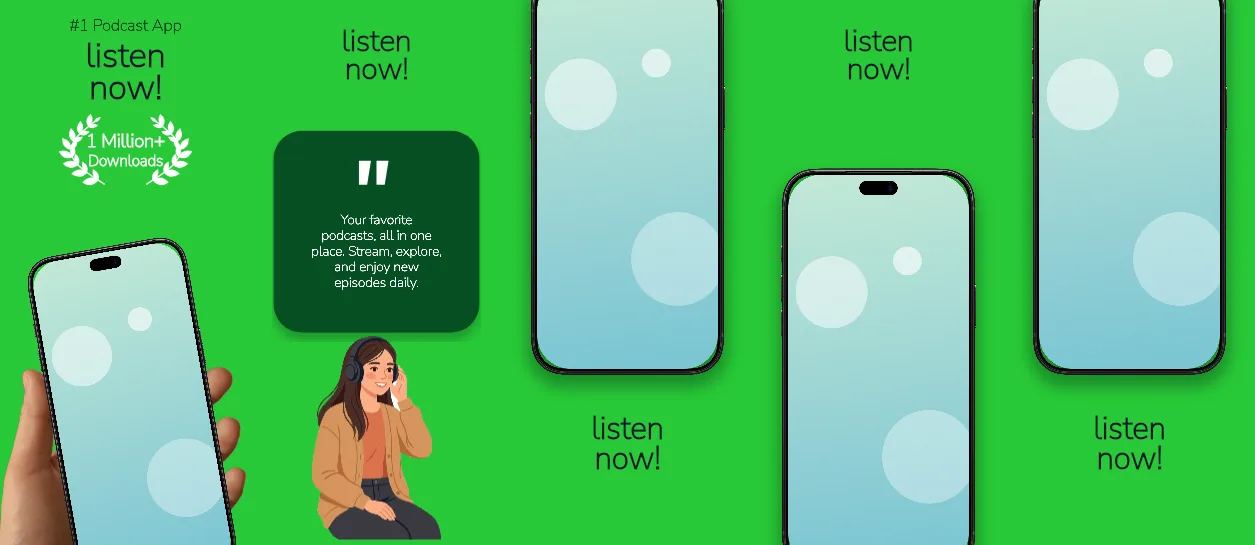
One flat #28C937 green across all five panels, heavy 161–184 px headlines in #0F172A, a dark #074F23 kicker, a white download badge and a tan handheld iPhone tilted −10° on the opening panel.
Free plan ($0 forever) · Pro $69/yr · No credit card required
Every background fill, gradient stop and headline color remains editable in Studio.
Practical walkthrough
Put your discovery or player capture in the handheld tan frame on panel 1; panels 3–5 use the upright black frame at 80% scale, so one capture set covers all five.
Keep the lead headline to two lines at 184 px — the box is 1,056 px wide and the renderer shrinks a third line rather than pushing the phone down.
Replace the demo quote on panel 2 (72 px white in a 950 px box) with a line you can support, then export five 1320 × 2868 PNGs.
Podcast, audio-story and radio apps
Listings that want one loud brand colour instead of gradients
Show-art-led captures that need a handheld frame
All five panels are 1320 × 2868 px on the same solid #28C937 green, with no gradient, so the strip holds its colour across a search row. Panel 1 carries an 86 px #074F23 kicker in a 1,056 px box, a 184 px Nunito Sans 900 headline, a 422 px white badge with an 80 px label and an iPhone 18 Pro Max handheld frame in the tan variant at 134% scale and −10° rotation. Panel 2 raises a 161 px headline to the top 138 px and sets a 72 px white quote in a 950 px box at 1,018 px from the top, with the phone cropped off the canvas so the quote is the only object. Panels 3 and 5 place the upright black frame in the top third at 80% scale and set a 166 px headline in a 1,109 px box starting at 2,180 px; panel 4 mirrors the layout with the headline on top and the phone at 68% of the panel height. Headlines, the kicker, the badge label and the quote stay editable text layers, and the handheld variant is a frame setting rather than a baked image. It belongs to the streaming app screenshot templates family; the gold border live sports set keeps a gradient and a review wall where this one uses flat colour and one quote, and the Emerald pitch playlist hub keeps the green but alternates it with #050505 panels for a music catalogue.
Questions
Yes. Upload your own PNG, JPEG or WebP app captures when creating the project and every device slot updates automatically.
Yes. The template opens as structured text, image, device and vector layers—never a flattened bitmap.
Yes. Connect https://appscreendesign.com/mcp in Claude, ChatGPT, Cursor or Codex and use the copyable prompt on this page.
Start with a composition. Keep every detail editable.