Keep one Watch resolution across all locales
Mixing 416 × 496 in English with an older Watch size in German causes App Store Connect validation errors. Exporting from one AppScreenDesign project guarantees uniform dimensions.
Size specification
WatchOS screenshots have strict rules in App Store Connect: 1–10 opaque images, consistent dimensions across every localization, and ultra-concise copy that reads at wrist scale.
416 × 496 px410 × 502 pxIdentical size across localesFree plan ($0 forever) · Pro $69/yr · No credit card required
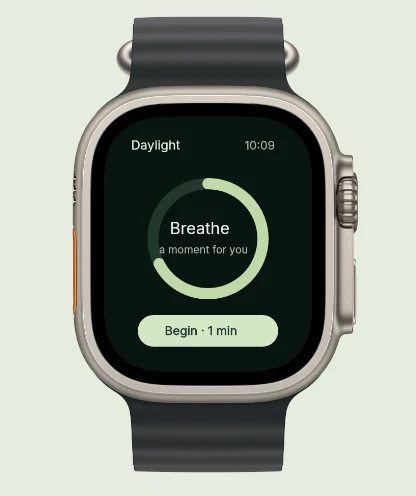
Exact pixel specifications
| Store slot | Portrait | Landscape / Canvas | Notes |
|---|---|---|---|
| Apple Watch Series 11 / 10 (46mm) | 416 × 496 px | — | AppScreenDesign family: watch · Primary modern Watch export preset |
| Apple Watch Ultra 2 / 3 (49mm) | 410 × 502 px | — | Supported in hardware frame library & accepted by App Store Connect |
| Localization Consistency Rule | Identical size across locales | — | Apple requires the exact same Watch pixel size across all app languages |
Practical walkthrough
Keep Watch captions minimal and dimensions identical across every language in your release.
Select active rings, complications or single-tap actions at native Watch resolution.
Frame inside 3D Series 11 cases or clean full-bleed layouts with 2–4 word captions.
Guarantee every localization shares the exact 416 × 496 pixel size required by App Store Connect.
Mixing 416 × 496 in English with an older Watch size in German causes App Store Connect validation errors. Exporting from one AppScreenDesign project guarantees uniform dimensions.
On a 416 × 496 canvas, either let the Watch face fill the slot cleanly or pair a 3D Watch Series 11 case with a punchy two-word label.
Frame wearable captures in physical 3D Watch cases with sport or ocean bands inside the Studio.
Users install Watch companions for timers, workout rings, boarding passes and complications—lead with that glanceable state rather than settings lists.
Raw Watch captures sometimes carry rounded transparent corners. Exporting through AppScreenDesign or our Alpha Channel Remover guarantees a compliant 24-bit opaque canvas.
Questions
Yes. Free ($0 forever) includes the full 3D browser studio, ready-made template library, Remote MCP access to test AI agents, and unlimited draft projects with watermarked preview exports.
Never. Every scene stays an editable multi-layer SceneDoc with live text, 3D hardware poses, backgrounds, vector badges and per-locale overrides.
No ($0 AI markup). Connect Claude, ChatGPT, Cursor or Codex via https://appscreendesign.com/mcp using the AI subscription you already have.
Start with a composition. Keep every detail editable.