A clear starting point
Hydration, vitamin and daily habit trackers
5-panel template
Vibrant royal-violet studio panels with crisp 3D iPhone angles built to spotlight rings, Lock Screen widgets and daily streaks.
Free plan ($0 forever) · Pro $69/yr · No credit card required
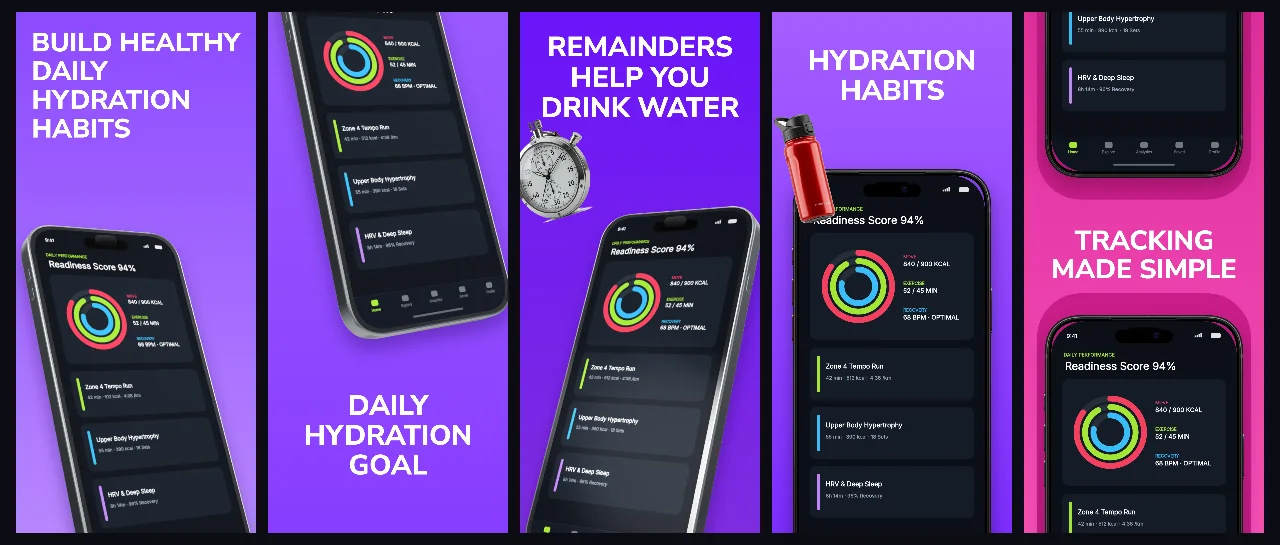
Every background fill, gradient stop and headline color remains editable in Studio.
Practical walkthrough
Show the one-tap daily logging ring on the opening panel.
Dedicate panels 2–5 to widgets, smart reminders and monthly trends.
Pair with a matching Apple Watch 46mm family tab in the same project.
Hydration, vitamin and daily habit trackers
Widget-first iOS utilities
Vibrant purple 3D launch sets
HydraCoach uses saturated violet depth and clean white headlines so progress rings and colorful charts read clearly at a glance.
Questions
Yes. Upload your own PNG, JPEG or WebP app captures when creating the project and every device slot updates automatically.
Yes. The template opens as structured text, image, device and vector layers—never a flattened bitmap.
Yes. Connect https://appscreendesign.com/mcp in Claude, ChatGPT, Cursor or Codex and use the copyable prompt on this page.
Start with a composition. Keep every detail editable.