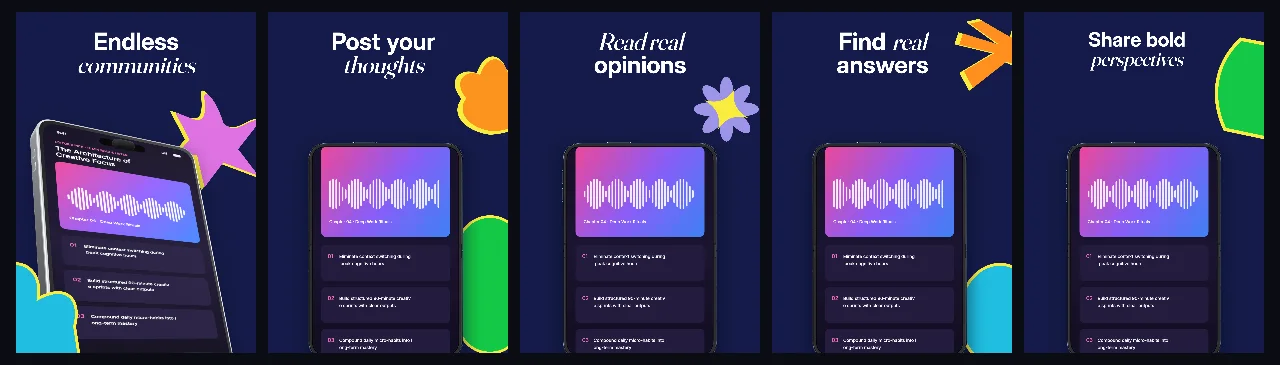
Midnight indigo #151B4A panels authored for the unfolded Duo inner display, with botanical splash shapes, a yellow headline band and an angled 3D device on every panel.
Explore templateForm-factor templates
A foldable listing is two canvases, not one: iPhone Duo covers export at 1398 × 2034 px and the unfolded inner display at 2007 × 2853 px. Start from a set drawn for the display you actually ship.
Free plan ($0 forever) · Pro $69/yr · No credit card required
Matching editable compositions
Midnight indigo #151B4A panels authored for the unfolded Duo inner display, with botanical splash shapes, a yellow headline band and an angled 3D device on every panel.
Explore template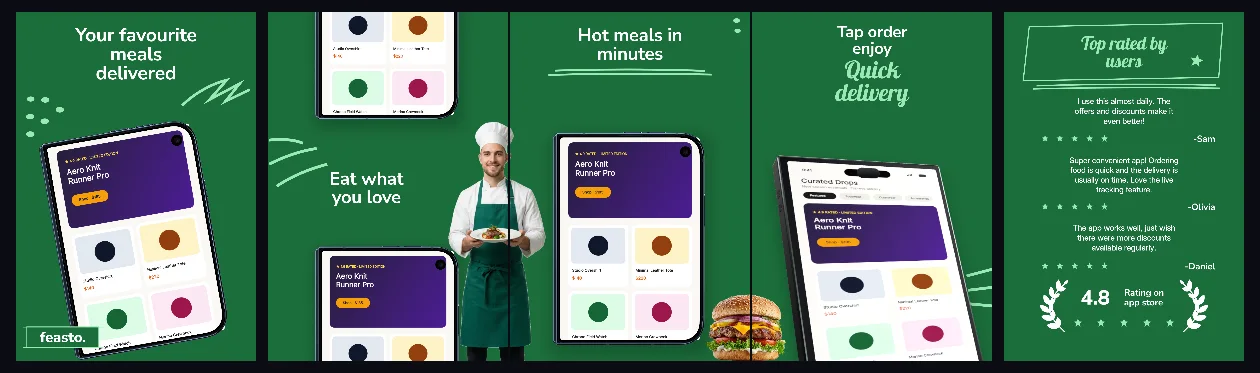
Forest green #1C6E3B cover sequence for the closed Duo outer display: handheld hero, split top-and-bottom menus, cursive delivery callout and a verified review wall.
Explore template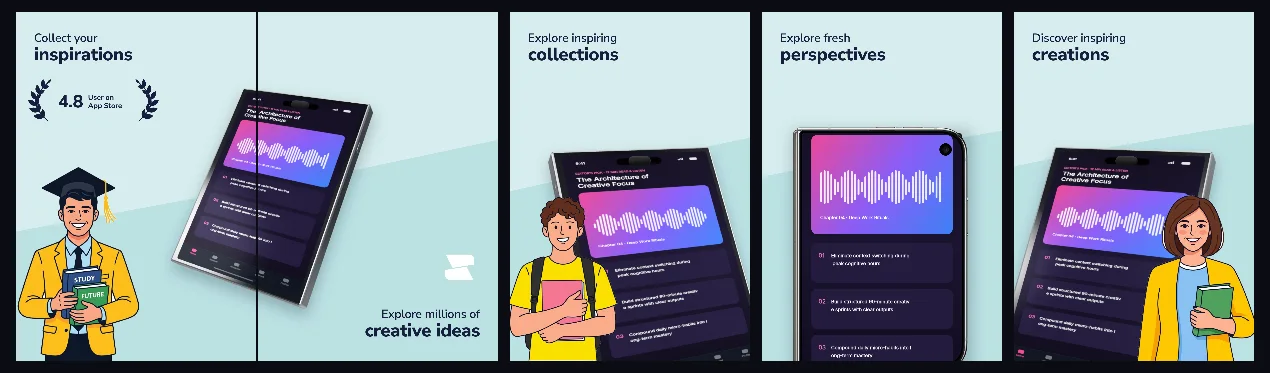
Ice-aqua #D7EDEE covers with a moodboard screen that crosses the panel seam, dark ink headlines and creator character cutouts for design and inspiration apps.
Explore template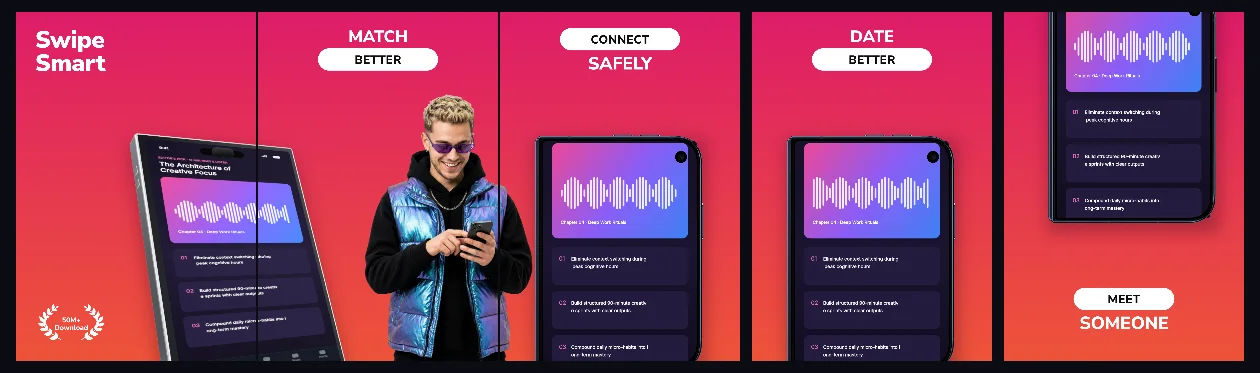
Magenta-to-coral covers for the closed Duo display: a 3D closed Duo on panel 1, white stadium pills carrying one word per panel and a laurel badge plate in the lower-left corner.
Explore templatePractical walkthrough
Foldable listings are submitted per family. Confirm whether the set is an iPhone Duo outer cover (1398 × 2034 px) or an unfolded inner display (2007 × 2853 px) before you compose anything, because the two ratios solve different layouts.
Open the Duo family your listing needs and start from a template authored on that canvas. Re-targeting an iPhone 1320 × 2868 set means rebuilding panel geometry instead of editing copy.
Each panel is an independent capture slot. Order them as the argument: promise, one concrete action, proof, second benefit, closing view that a returning user would recognize.
Shrink panel 1 to roughly 260 px wide. If a two-line headline or a thread row stops reading, shorten the copy instead of lowering the type below the rest of the set.
AppScreenDesign lists iPhone Duo (outer) at 1398 × 2034 px and iPhone Duo (inner) at 2007 × 2853 px. Choosing the family first stops a headline from being stretched between two different ratios.
Each foldable sequence ships as a five-panel SceneDoc: swap captures and headlines while the 3D hardware poses, botanical shapes and headline bands stay structured layers.
The forum and moodboard sets carry real text layers rather than baked captions, so a longer German headline or a shorter Japanese one is a copy edit, not a redesign.
The closed cover is 0.687:1 and the unfolded display is 0.703:1, so a food-delivery story built around a handheld frame — the closed-cover iPhone Duo food delivery set — reads differently from a thread-heavy community flow — the unfolded iPhone Duo forum template. Both open in the same studio, but panel geometry and the iPhone Duo screenshot sizes reference are what you confirm before uploading captures.
A connected moodboard or device across panels 1 and 2 only pays off if the bridge still aligns once the store renders the cover — the creative moodboard Duo sequence is built that way. Keep panel 1 readable on its own, then let panel 2 continue the same artwork instead of restarting it. Palette is the other axis: the magenta-to-coral iPhone Duo dating covers hold the closed-cover aspect and drop the bridge in favour of one word per panel, which is the safer choice when the screens themselves never touch.
Questions
Yes. Free ($0 forever) includes the full 3D browser studio, ready-made template library, Remote MCP access to test AI agents, and unlimited draft projects with watermarked preview exports.
Never. Every scene stays an editable multi-layer SceneDoc with live text, 3D hardware poses, backgrounds, vector badges and per-locale overrides.
No ($0 AI markup). Connect Claude, ChatGPT, Cursor or Codex via https://appscreendesign.com/mcp using the AI subscription you already have.
Only the family you submit. iPhone Duo (outer) exports 1398 × 2034 px and iPhone Duo (inner) 2007 × 2853 px; every template on this page is authored for one of the two, and its card names the canvas.
Start with a composition. Keep every detail editable.